A More Colorful World
In this stage we will add color. The user will be able to choose from several color schemes using a drop down menu. Both black and white schemes that we used thus far will be available, but also some more colorful ones. The code of this stage can be found in branch 4-coloring.
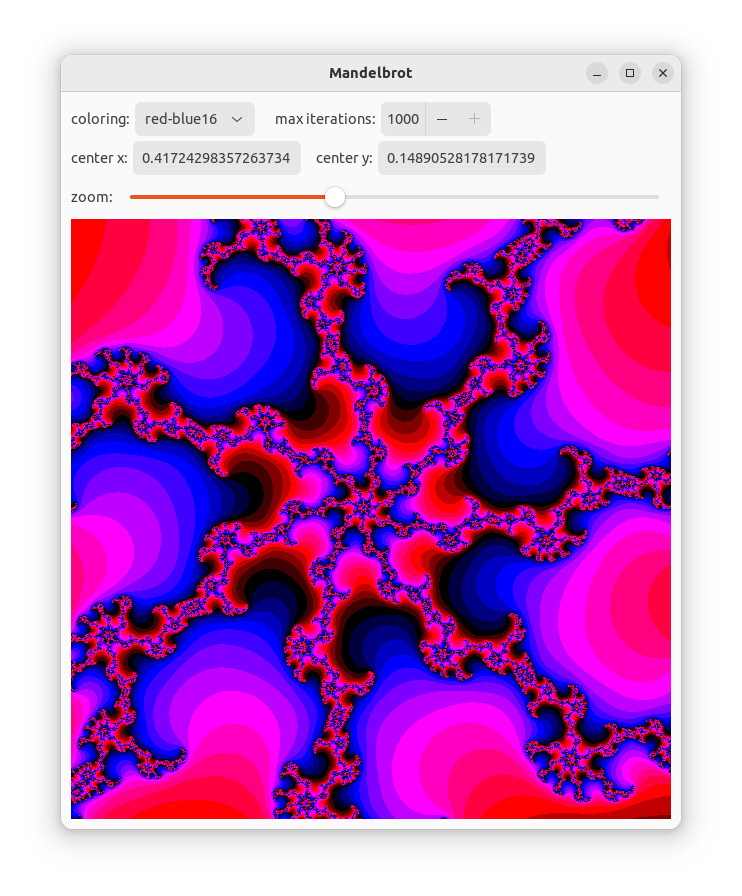
We start by defining a trait that every color scheme must implement. This trait as well as most other new code is in the new file colorings.rs.
#![allow(unused)]
fn main() {
pub trait Coloring {
    fn get_color(&self, v: u32, max: u32) -> u32;
    fn name(&self) -> &str;
}
}
The function get_color has the same signature as color_from_mandel which we implemented in the previous stage. It will replace that function and works in the same way.
The function name returns a name for the color scheme that will be used in the user interface.
#![allow(unused)]
fn main() {
impl ColorInfo {
    pub fn new() -> ColorInfo {
       ColorInfo {
           colorings: all_colorings(),
       }
    }
    pub fn len(&self) -> usize {
       self.colorings.len()
    }
    pub fn scheme(&self, i: usize) -> &Box<dyn Coloring> {
       &self.colorings[i]
    }
    pub fn names_iter(&self) -> NameIter {
       NameIter { iter: self.colorings.iter() }
    }
}
}
The struct ColorInfo collects all color schemes. The function len returns the number of schemes. The function scheme returns a scheme, given an index in the range 0..len. The function names_iter returns an iterator over all the names of the schemes (in the same as in scheme).
Here we don't discuss the implementation of the different color schemes. Have a look at the code, if you are interested.
Changes in the State
In the user interface we have to keep track of the current color scheme.
#![allow(unused)]
fn main() {
struct State {
    mapping: Mapping,
    img: Option<ImageSurface>,
    col_idx: usize,
    color_info: ColorInfo,
    canvas: WeakRef<DrawingArea>,
}
}
The index of the current color scheme is stored in col_idx. We also need access to the color schemes from callback functions, so we store a ColorInfo object.
#![allow(unused)]
fn main() {
impl State {
    pub fn new() -> State {
        State {
            col_idx: 0,
            color_info: ColorInfo::new(),
            ...
        }
    }
    pub fn coloring_names(&self) -> Vec<&str> {
        self.color_info.names_iter().collect()
    }
    pub fn set_col_idx(&mut self, col_idx: usize) {
        self.col_idx = col_idx;
        self.recompute_image();
    }
    ...
}
}
In the function new those fields are initialized. The function coloring_names returns a vector the names. The function set_col_idx allows changing the coloring. It takes care that the image is recomputed.
#![allow(unused)]
fn main() {
    fn recompute_image(&mut self) {
        let coloring = self.color_info.scheme(self.col_idx);
        if let Some(img) = make_mandel_image(&self.mapping, coloring) {
            self.set_img(img);
        }
    }
}
In recompute_image we get the color scheme belonging to the color index and pass that scheme as an extra parameter to make_mandel_image. That functions passes this scheme through until the point where it gets used instead of function color_from_mandel.
Changes in the GUI
#![allow(unused)]
fn main() {
    let colorings = DropDown::from_strings(&state.borrow().coloring_names());
    colorings.set_width_request(120);
    colorings.set_margin_end(15);
    // ...
    first_row.append(&Label::new(Some("coloring:")));
    first_row.append(&colorings);
}
We add a DropDown user interface element. This dropdown is initialized with a list of all color scheme names.
We put this drop down widget on the first row.
#![allow(unused)]
fn main() {
    colorings.connect_selected_notify(clone!(@strong state => move |dd| {
        color_changed(&mut state.borrow_mut(), dd);
    }));
}
We connect a handler to the signal selected-notify of the drop down widget.
#![allow(unused)]
fn main() {
fn color_changed(state: &mut State, dd: &DropDown) {
    let sel = dd.selected();
    if sel != GTK_INVALID_LIST_POSITION {
        state.set_col_idx(sel as usize);
    }
}
}
The signal handler gets the selected line from the drop down widget and stores it in the state.